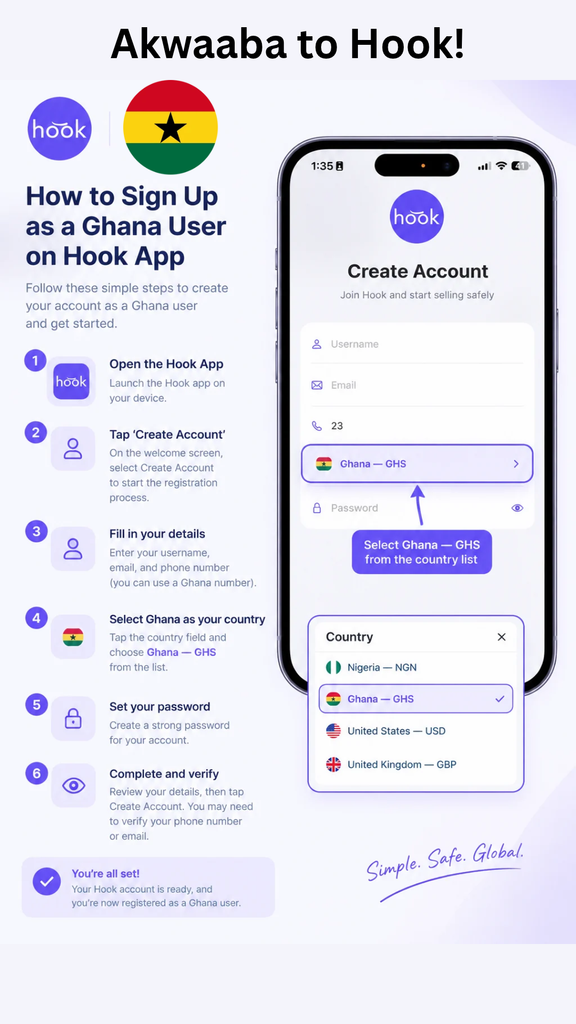
Want to turn your gift cards into Ghanaian cedis? Start by creating a Hook account and selecting Ghana — GHS as your country option. The signup guide walks you through entering your details, setting a password, and completing any required verification. See gift cards into Ghanaian cedis rates
This guide explains how to register as a Ghanaian user and get ready to explore the gift card trading options available in the app.
How to Create a Hook Account in Ghana
1. Open the Hook App
Launch the Hook app on your device to begin registration.
2. Tap “Create Account”
On the welcome screen, select “Create Account” to start setting up your account.
3. Enter Your Details
Fill in your username, email address, and phone number. You can use a Ghanaian phone number when registering. Check that your details are correct before continuing.
4. Select Ghana as Your Country
Tap the country field and choose “Ghana — GHS” from the list. This is the country option shown in Hook’s registration guide for Ghanaian users.
5. Set Your Password
Create a strong password for your account, then review the information you have entered.
6. Complete Registration and Verify Your Account
Tap “Create Account” to finish signing up. You may need to verify your phone number or email address to complete the process. Once registration is complete, your account is set up as a Ghana user.
Getting Ready to Trade Gift Cards for Ghanaian Cedis
Creating your account is the first step. Before submitting a gift card for a trade, check the information available inside Hook, including:
- Whether your gift card brand and issuing country are supported.
- The current offer for your card’s value and currency.
- Any applicable fees or trading conditions.
- The required card details and proof of purchase, if requested.
- The available GHS payout methods and estimated processing time.
Can You Trade Gift Cards to Cedis in Seconds?
Getting started can be straightforward, but “in seconds” should not be treated as a guaranteed payout time. The supplied image does not establish how long gift card verification, trade approval, or payment takes. Check the timing displayed for your transaction before confirming a trade.
For a clearer expectation, focus on the complete journey: create your account, review the available trading options, confirm the offer, and follow the instructions shown in the app.
Frequently Asked Questions
Can Ghanaians sign up on Hook?
Yes. Hook’s signup guide shows a registration process for Ghanaian users and instructs them to select “Ghana — GHS” from the country list.
Can I register with a Ghanaian phone number?
Yes. The guide states that you can use a Ghanaian phone number when entering your account details.
Do I need to verify my account?
You may need to verify your phone number or email address after submitting your registration details.
Which country option should I choose?
Select “Ghana — GHS” when setting up your account as a Ghanaian user.
Get Started With Hook in Ghana
Open Hook, tap “Create Account,” enter your details, and choose “Ghana — GHS.” Set your password and complete any requested verification to finish registration. Then check the app’s available gift card trading options, rates, and payout terms before making your first trade.